

28 Oct, 2026
Best HRMS Software in India: Features and Benefits for Businesses
HRMS Software
Payroll Management
Attendance Management
HR Automation
Employee Management
Cloud HRMS
Biometric Attendance
Leave Management
PF & ESI Compliance
HR Analytics
Employee Self-Service
Recruitment Management
OceanHR
Post By : Ocean Infotech
Published : 28-10-2026
What Is HRMS Software and Why Does It Matter?
Managing people with spreadsheets, paper registers and scattered WhatsApp messages works only until your team starts to grow. Missed attendance entries, payroll errors and compliance deadlines quickly turn HR into a firefighting department. That is why more companies are adopting HRMS software in India to bring hiring, attendance, leave, payroll and performance into one place. If you want to see how a modern platform works in practice, explore our HRMS software for Indian companies while reading this guide.
Managing people with spreadsheets, paper registers and scattered WhatsApp messages works only until your team starts to grow. Missed attendance entries, payroll errors and compliance deadlines quickly turn HR into a firefighting department. That is why more companies are adopting HRMS software in India to bring hiring, attendance, leave, payroll and performance into one place. If you want to see how a modern platform works in practice, explore our HRMS software for Indian companies while reading this guide.
Managing people with spreadsheets, paper registers and scattered WhatsApp messages works only until your team starts to grow. Missed attendance entries, payroll errors and compliance deadlines quickly turn HR into a firefighting department. That is why more companies are adopting HRMS software in India to bring hiring, attendance, leave, payroll and performance into one place. If you want to see how a modern platform works in practice, explore our HRMS software for Indian companies while reading this guide.
Key Features to Look for in HRMS Software in India
A Human Resource Management System (HRMS) is a digital platform that automates the daily work of the HR department. Instead of maintaining separate files for employee data, leave balances and salary sheets, everything is stored in one secure database that managers and employees can access based on their role.
Why Indian businesses need a local solution?
Indian companies deal with rules that global tools often do not handle well. Provident Fund (PF), Employee State Insurance (ESI), Professional Tax, Labour Welfare Fund, TDS on salary and state-wise holiday calendars all affect how salaries are calculated. A system built for Indian conditions understands these rules out of the box. That is the main reason businesses prefer HRMS software in India over generic international products.
Who benefits most?
HR managers, payroll teams, department heads, business owners and employees all benefit. HR saves time, owners get accurate reports, and employees get transparency about their attendance, leaves and payslips.
Why Indian businesses need a local solution?
Indian companies deal with rules that global tools often do not handle well. Provident Fund (PF), Employee State Insurance (ESI), Professional Tax, Labour Welfare Fund, TDS on salary and state-wise holiday calendars all affect how salaries are calculated. A system built for Indian conditions understands these rules out of the box. That is the main reason businesses prefer HRMS software in India over generic international products.
Who benefits most?
HR managers, payroll teams, department heads, business owners and employees all benefit. HR saves time, owners get accurate reports, and employees get transparency about their attendance, leaves and payslips.
Benefits of Using HRMS Software in India
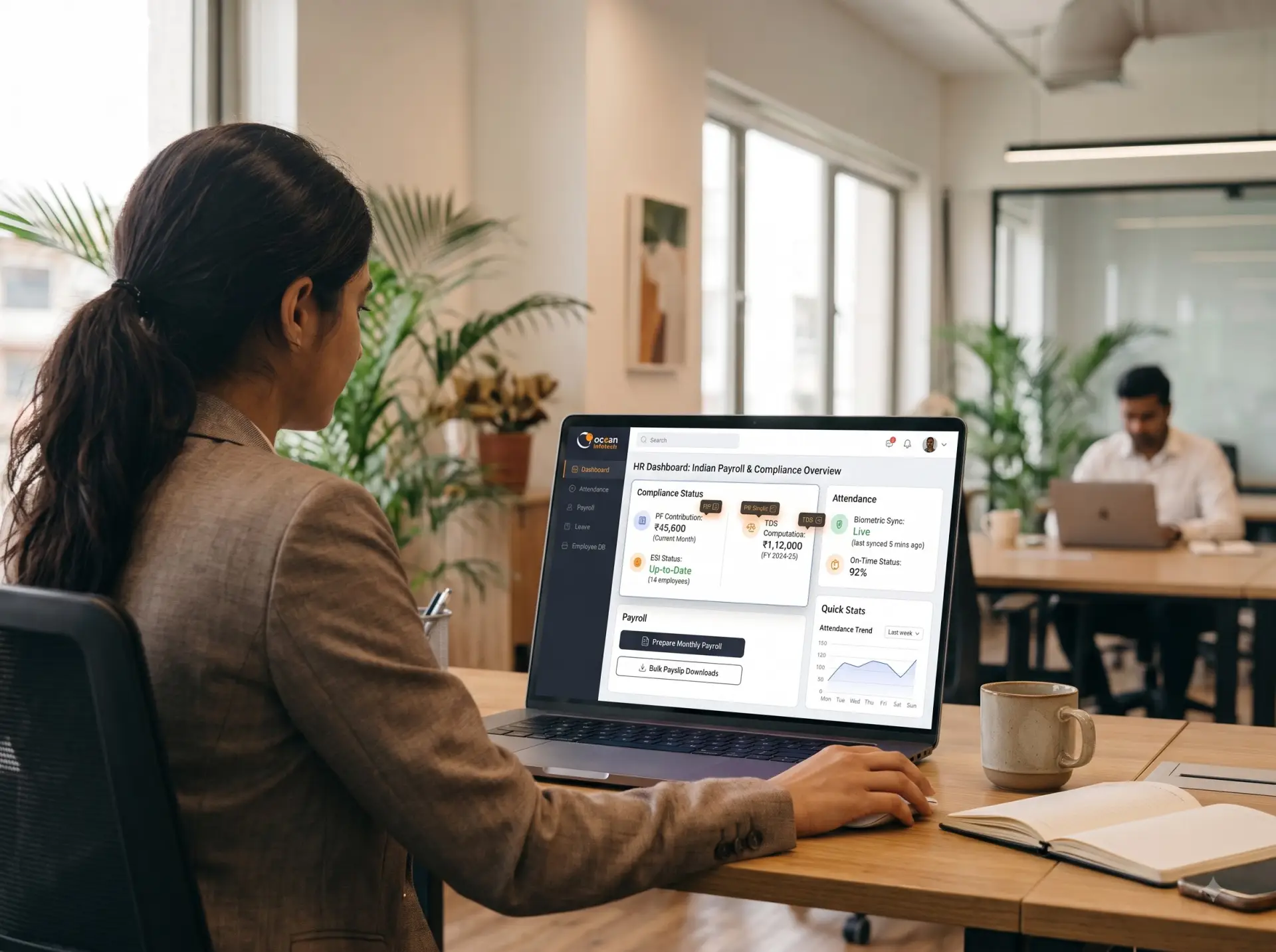
Not every tool is equal. Before you shortlist a vendor, check whether the following modules are available and genuinely usable.
Core HR and employee database
Centralised employee profiles with documents such as Aadhaar, PAN and appointment letters
Organisation chart, department and designation mapping
- Joining, confirmation, transfer and exit workflows
- Role-based access so sensitive data stays protected
- Attendance and leave management
Accurate attendance is the base of correct payroll. A good system supports biometric devices, mobile check-in with GPS, shift rosters, late-mark rules and overtime calculation. Leave policies such as casual leave, sick leave, earned leave and comp-off should be configurable without developer help.
Payroll and statutory compliance
Payroll is where most manual errors happen. Look for automatic salary structure creation, arrears, reimbursements, loan deductions, PF and ESI calculation, TDS computation and ready-to-file challans and returns. Payslips should be generated and emailed to employees in a single click.
Recruitment and onboarding
From job posting to offer letter, a digital recruitment module reduces hiring time. Automated onboarding checklists make sure that laptops, email IDs, documents and induction sessions are ready before the new employee’s first day.
Performance management
Goal setting, periodic reviews, feedback and appraisal cycles keep performance conversations structured instead of emotional. Reports show which teams are growing and where support is needed.
Reports and analytics
Headcount, attrition, absenteeism, payroll cost and department-wise expense dashboards help leaders make decisions based on facts.
Manual HR process vs HRMS
The advantages show up within the first few months of use. Here is what businesses commonly notice.
- . Time savings for HR teams. Tasks that took days, such as collecting attendance and preparing salary sheets, are completed in hours. HR can then spend time on hiring, engagement and training.
- . Fewer payroll mistakes. Automatic calculations remove the manual formula errors that cause salary disputes and employee dissatisfaction.
- . Compliance with confidence. Statutory rules change from time to time. A well-maintained system updates rates and slabs so that you stay compliant with PF, ESI and TDS requirements without constant manual tracking.
- . Better employee experience. Self-service access lets employees apply for leave, download payslips and update personal details without chasing HR.
- . Data security. Employee information is encrypted and protected by user permissions, backups and audit trails, which is far safer than loose spreadsheets.
- . Scalability. Whether you have 25 employees or 500, the platform grows with you without rebuilding processes.
How to Choose the Best HRMS Software in India
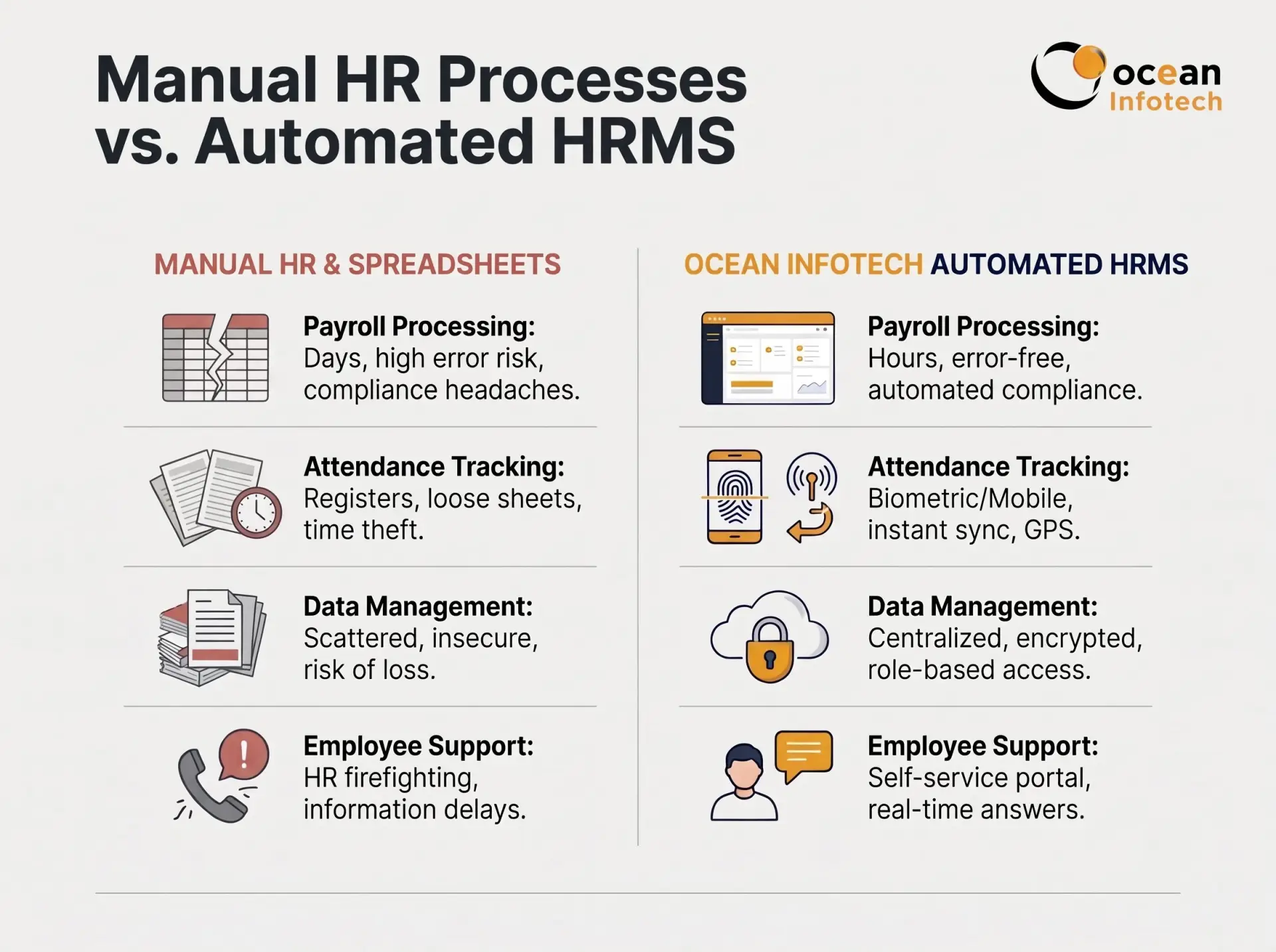
| Area | Manual or Excel-based HR | HRMS Software in India |
|---|---|---|
| Attendance Tracking | Registers and manual entry | Biometric, mobile and automated sync |
| Payroll Processing | 2 to 4 days, high error risk | Same day, formula-based accuracy |
| Compliance Filing | Manual calculation and tracking | Auto-calculated PF, ESI and TDS |
| Employee Queries | Phone calls and emails to HR | Self-service portal, 24x7 |
| Reporting | Time-consuming consolidation | Real-time dashboards |
| Data Safety | Risk of loss and leakage | Role-based, backed up and encrypted |
Questions to ask in the demo
Selecting software is a business decision, not just a technology purchase. Follow these steps for a smarter evaluation.
List your problems first. Write down what hurts today, such as late salary, leave confusion or compliance stress.
Check Indian compliance depth. Ask for a demo of PF, ESI, Professional Tax and TDS workflows for your state.
Test the user experience. If employees and managers find it complicated, adoption will fail.
Ask about integrations. Biometric machines, accounting software and email should connect easily.
Verify support quality. Fast, local support in Hindi, Gujarati or English matters when payroll day arrives.
Understand pricing. Compare per-employee pricing, setup charges, customisation costs and renewal terms.
Request references. Speak to existing customers of similar size and industry. You can start by reviewing a real HRMS project in our portfolio.
Common Mistakes Businesses Make While Buying an HRMS
Can I configure my own salary structure? How are mid-month joiners handled? Can I export data if I leave? Is there an audit trail for changes?
A quick note on customisation
Every company has unique policies. Choose a vendor that can adapt workflows, approval chains and reports instead of forcing you to change your business rules. If your needs go beyond standard modules, a team offering custom software development services can extend the system with extra dashboards, portals or integrations.
Implementation Roadmap: From Decision to Go-Live
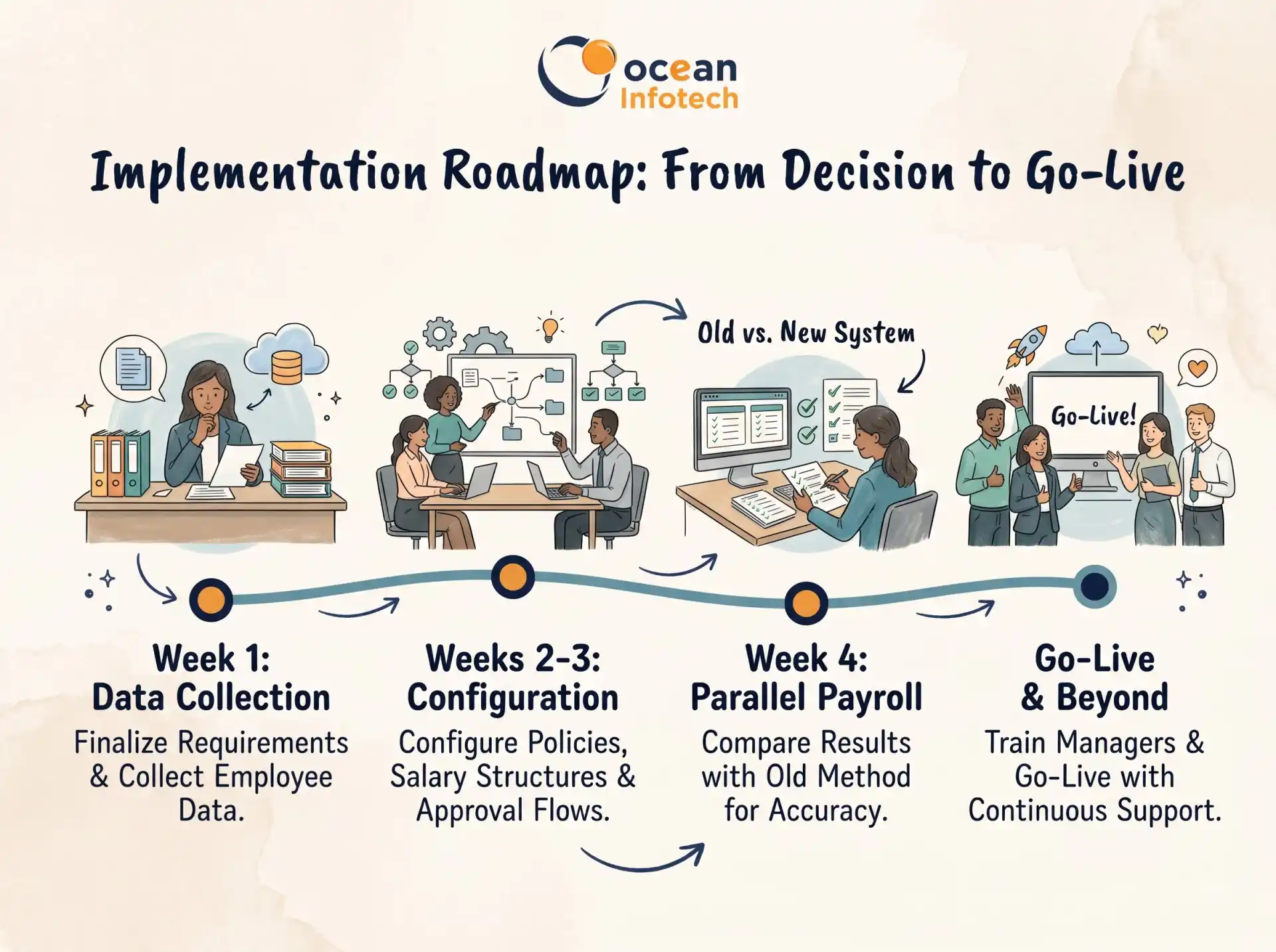
Many implementations fail for avoidable reasons. Choosing only on price, skipping employee training, migrating messy data without cleaning it, and not assigning an internal owner are the most frequent problems. Start with a small rollout, such as attendance and leave, and then add payroll and performance modules in phases. This keeps the team comfortable and gives quick wins to show management.
Frequently Asked Questions (FAQs)
A realistic timeline is four to eight weeks. In week one, finalise requirements and collect employee data. In weeks two and three, configure policies, salary structures and approval flows. In week four, run a parallel payroll to compare results with your old method. After that, train managers and employees, then go live with continuous support. Reviewing usage reports after the first month helps you fix gaps early. A dedicated annual maintenance service (AMC) keeps the platform updated, secure and running smoothly after launch.
Conclusion
- . What is the cost of HRMS software in India?
Pricing usually depends on the number of employees and modules. Many vendors charge a monthly or yearly fee per employee, plus one-time setup or customisation. Small businesses can start with basic plans and upgrade later.
- . Is HRMS suitable for a company with only 20 employees?
Yes. Even a small team loses hours every month on attendance and salary calculation. A simple plan removes this effort and prepares you for growth.
- . Can HRMS handle PF, ESI and TDS calculations?
A properly built system calculates these automatically according to current rules and generates the reports needed for filing. Always confirm that your state-specific requirements are supported.
- . Can we connect biometric attendance machines?
Most platforms support integration with popular biometric devices. Ask the vendor for the list of supported brands before buying.
- . Is employee data safe in a cloud HRMS?
Reputable providers use encryption, access controls, regular backups and secure servers. This is usually safer than storing data on personal computers.
- . How long does implementation take?
Basic setup can be finished in a couple of weeks. A full rollout with payroll, compliance and training typically takes four to eight weeks.
- . Can employees use it from mobile?
Yes. Mobile access lets employees mark attendance, apply for leave and download payslips from anywhere.
- . What if our salary structure is complex?
Choose a vendor offering configurable salary components, so allowances, incentives and deductions follow your exact policy.
Choosing the right HRMS software in India helps you reduce paperwork, avoid payroll errors, stay compliant and give employees a smoother experience. Start by listing your needs, test the software with real scenarios and implement in phases for best results. If you are ready to modernise your HR operations, contact Ocean Infotech for a free HRMS demo and get a solution that fits your business.
Smarter HR Management Starts with the Right Technology



Comments